
💡 Quick Summary & Key Takeaways
- Direct Answer: JPEG uses Discrete Cosine Transform (DCT) quantization to compress photographic color blocks, trading invisible high-frequency nuances for drastic byte savings.
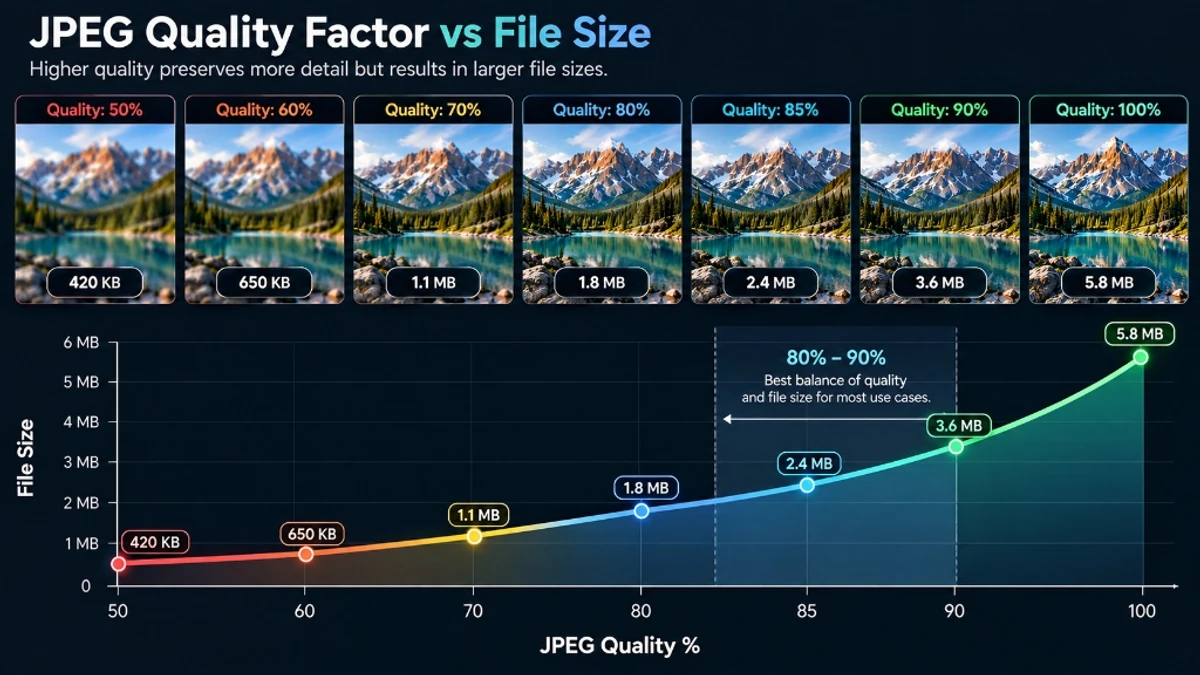
- Recommended Slider Setting: 82% quality is the industry gold standard for web publishing and email attachments (60%–75% reduction, artifact-free).
- Client-Side Privacy: No server roundtrips. All quantization occurs on your device.
- Instant Tool: Open the ToolDolfen Compress JPG Tool to reduce photo weight in milliseconds.
How JPEG Compression Works Under the Hood
JPEG compression runs your image through a three-stage pipeline:
1. Color Space Conversion (RGB → YCbCr) Human vision is far more sensitive to brightness (luminance, Y) than to color information (chrominance, Cb and Cr). JPEG exploits this by separating image data into one luminance channel and two chrominance channels, then applies heavier downsampling to the chrominance channels where the human eye cannot detect the loss.
2. Discrete Cosine Transform (DCT) Each 8×8 block of pixels is transformed from spatial domain into frequency domain using DCT. Low-frequency components (broad gradients, solid colors) are stored with high precision. High-frequency components (fine details, sharp edges) are discarded according to a quantization matrix — and this is the lossy step.
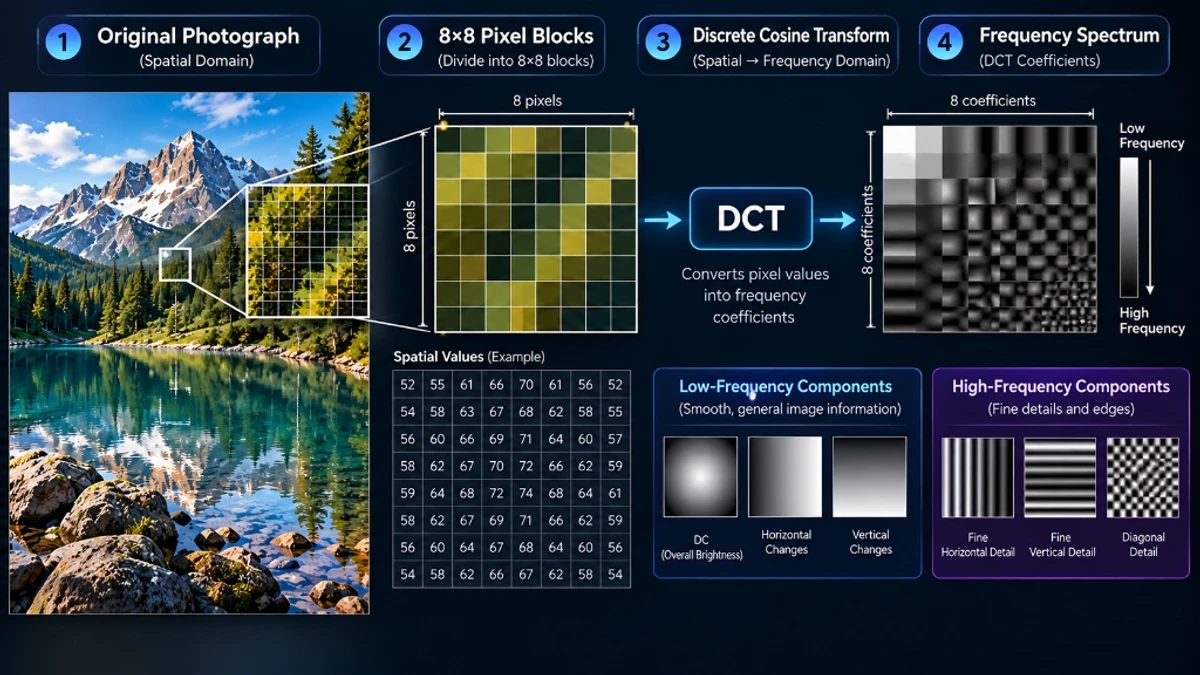
3. Entropy Encoding (Huffman Coding) The quantized DCT coefficients are then compressed losslessly using Huffman coding. The quality slider controls how aggressively the quantization matrix discards high-frequency detail.
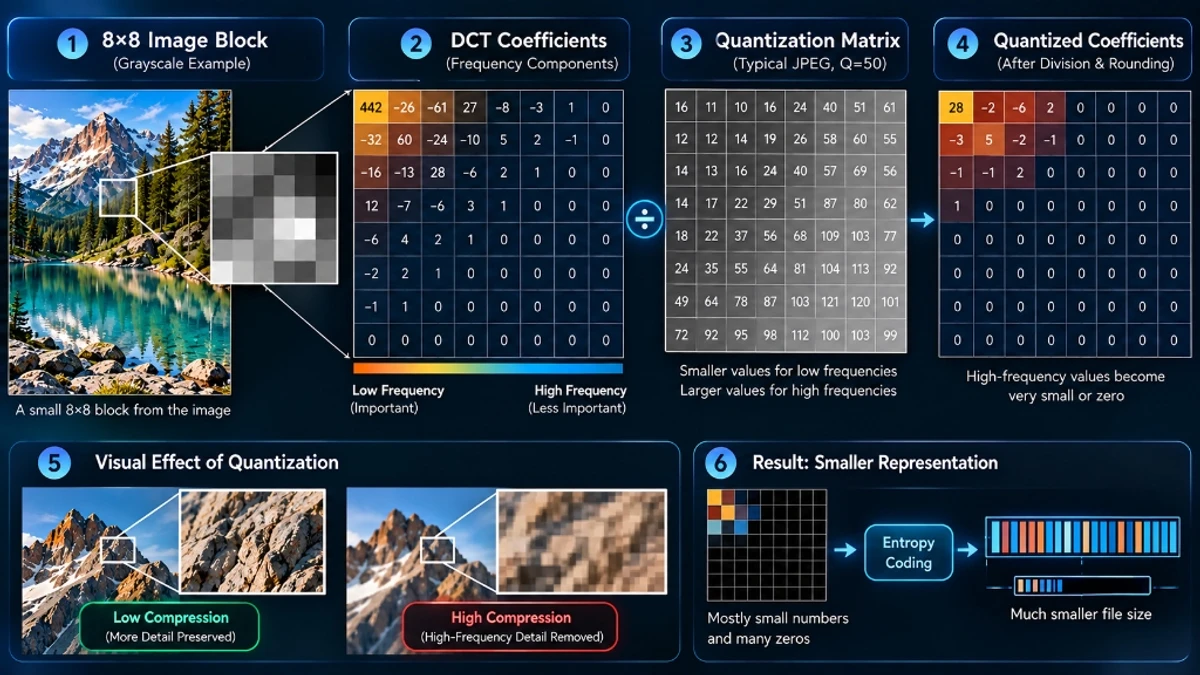
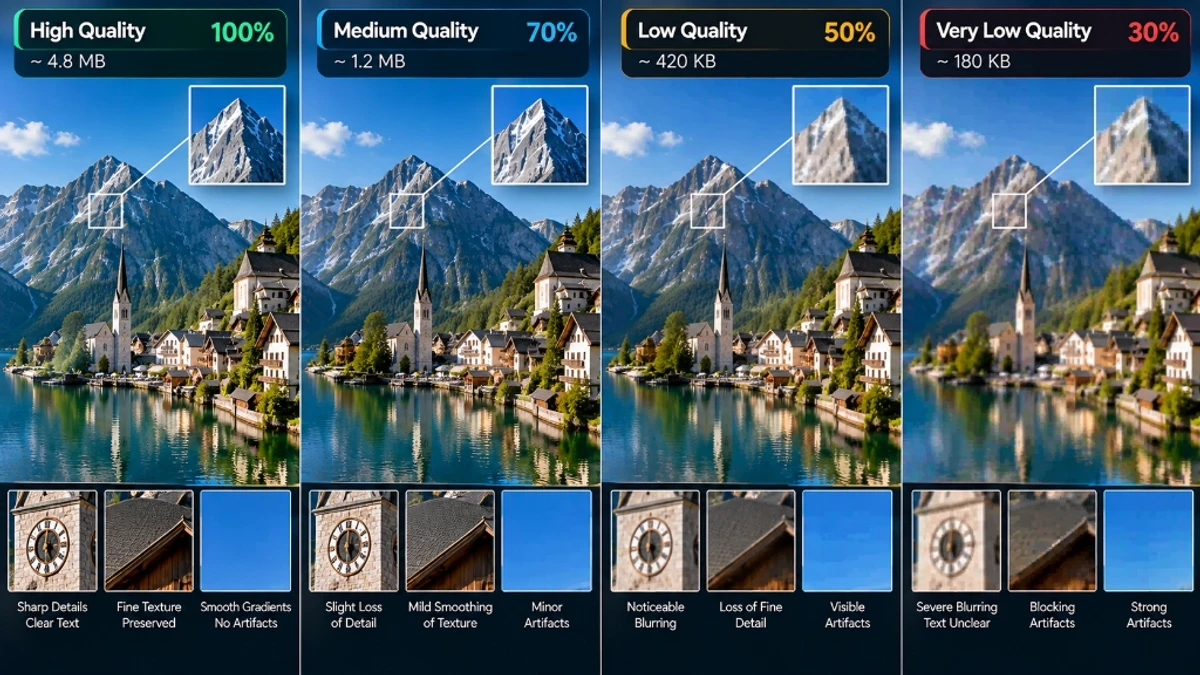
At quality 85, a typical 6MB smartphone photo becomes 400–600KB. At quality 70, you might hit 180–250KB but start seeing block artifacts around sharp edges.
Email Attachments and Portal File Size Limits
Common JPEG scenarios in real workflows:
| Scenario | File Size Limit |
|---|---|
| Gmail / Outlook attachment | Under 25MB total per email |
| WhatsApp image sharing | Under 5MB for full resolution |
| LinkedIn profile photo | Under 8MB (best under 500KB) |
| Job portal resume photo | Usually 50KB–500KB |
| US visa application photo | Under 240KB, 240–600px dimensions |
A 12-megapixel smartphone JPEG from the camera typically runs 3MB to 8MB. Applying quality-85 compression brings these under 600KB with no visible quality loss.
Quality Sliders: The 80% Sweet Spot Explained
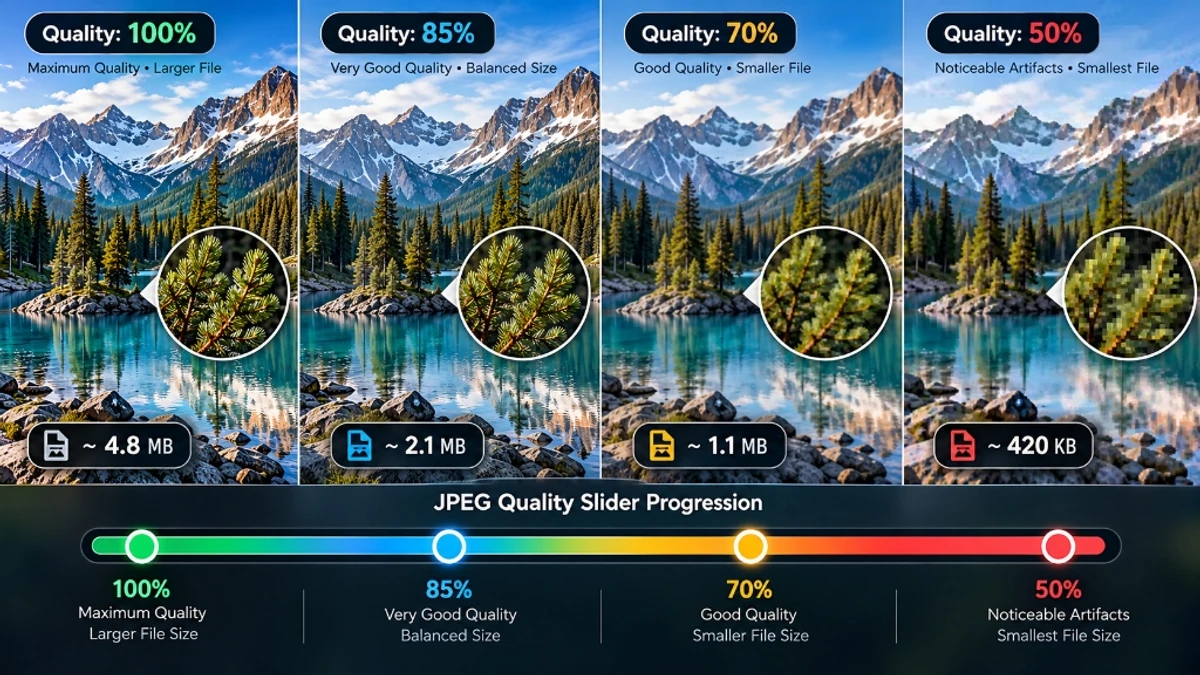
The 90–100% Range: Beautiful but Wasteful
At quality 90–100, the file stores near-lossless data. File sizes often exceed 1MB–4MB for standard photographs. The perceptual difference versus quality 85 is invisible to human observers. Reserve this range for archival masters only.
The 80–88% Range: The Professional Standard
This is the standard used by major image CDNs including Google, Cloudflare, and Imgix. At quality 82–85, a typical portrait reaches 300KB–600KB with crisp skin tones and zero visible block artifacts.
Below 70%: Artifacts Become Visible
At quality 60, DCT block boundaries become visible as a grid in smooth areas (skies, skin). At quality 50, text in photographs starts breaking down. Below 40%, JPEG is unsuitable for professional use.
Step-by-Step: Compressing JPGs on ToolDolfen
- Open the ToolDolfen Compress JPG tool. No account or installation required.
- Drag your JPG file into the browser dropzone. All processing happens locally — zero server upload.
- Start with quality 82. Review the displayed output size.
- Compare visually — zoom into sharp edges and text areas to check for artifacts.
- Download your compressed JPG directly to your computer.
Privacy note: ToolDolfen processes all image compression locally in your browser using the HTML5 Canvas API. Your files never leave your device.
JPEG vs WebP: When to Modernize Your Images
For web delivery, WebP format produces files 25–35% smaller than JPEG at equivalent visual quality, while also supporting transparency.
| Format | Transparency | Compression | Browser Support | Best For |
|---|---|---|---|---|
| JPEG | ❌ | Lossy | Universal | Photos, e-commerce, email |
| WebP | ✅ | Lossy + Lossless | 95%+ browsers | Web images, blogs, landing pages |
For email attachments and physical document portals, JPEG remains the standard. For web delivery, use the JPG to WebP converter to gain an additional 25–35% size reduction without touching a quality slider.
Recommended Companion Guides
Explore complementary tutorials and utilities from this topic cluster to enhance your digital workflow: